
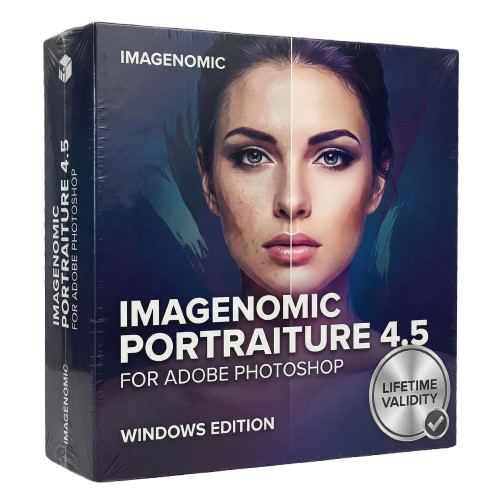
Imagenomic Portraiture 4.5 for Photoshop
- AUTOMATIC DELIVERY INSTANTLY ON REGISTERED EMAIL .
- Any Installation Problem Freely Contact Us(Will Give You Support)
- Lifetime Validity
- Windows Version
- Smooth skin naturally while preserving texture using advanced AI algorithms.
- Generate precise skin masks automatically to isolate subjects instantly.
- Process massive batches of photos rapidly with optimized multi-core performance.
- Remove blemishes and imperfections without blurring eyelashes or eyebrows.
- Even out skin tones to correct redness and blotchiness effortlessly.
- Apply professional retouching styles quickly with a customizable preset library.
- Fine-tune mask selection manually with the interactive refinement brush.
Original price was: ₹999.00.₹499.00Current price is: ₹499.00.
Overview of Imagenomic Portraiture for Adobe Photoshop
Imagenomic Portraiture is an Adobe Photoshop CC or Elements that eliminates the tedious manual labor of selective masking and pixel-by-pixel treatments to help you achieve excellence in portrait retouching. It intelligently smoothens and removes imperfections while preserving skin texture and other important portrait details such as hair, eyebrows, eyelashes, etc.
Portraiture is built on the core technology and feature set of the original Portraiture Plugin. It will take your skin retouching workflow to the next level of performance, quality of results, and overall ease of use.
Dare we say; our Imagenomic Portraiture Plug-in will continue to transform the industry by enabling virtually all skill levels to achieve excellence in skin retouching across the spectrum of image subjects and production challenges, including portrait, full-body, group shots, advertising, fashion, beauty, medical, and motion imagery, and without the familiar constraints or learning curves associated with other software products, plug-ins or digital retouching techniques.
Features of Imagenomic Portraiture for Adobe Photoshop
- Multiprocessor support for maximum retouching speed and workflow performance
- Enhanced skin masking control that isolates adjustments to just the skin mask, in addition to global adjustments.
- Preset power and the flexibility to create, capture and share custom settings with the new Preset Manager
- New Preference Settings, including customizable latitude adjustments for mask defaults, User Interface skins, and image display preferences
- An auto-updating feature, so you always have the latest updates from Imagenomic
Host
Adobe Photoshop
Version 4
Portraiture 4 features 8/16 bit
RGB/LAB
Only for Photoshop
Smart Filter and Action Support
– Only for Photoshop
– Custom filter preset support
Other
– Any image format for Photoshop
– JPEG and TIFF for Lightroom
Related Products
- Lifetime Validity
- Instant Delivery on Email
- Any Installation Problem Freely Contact Us(Will Give You Support)
- Supported on Windows 10,11
- Pre-Activated for Lifetime Validity
Adobe Photoshop is the industry-leading digital image editing and design application that offers the tools to create anything you can imagine.
- AUTOMATIC DELIVERY INSTANTLY ON REGISTERED EMAIL .
- Any Installation Problem Freely Contact Us(Will Give You Support)
- Lifetime Validity
- Windows Version
- Create smoother, band-free color transitions with new gradient dithering and perceptual blending modes.
- Rotate 2D vector artwork in 3D space to explore dynamic angles with the innovative Turntable tool.
- Identify fonts from raster images or outlined text instantly using the AI-powered Retype feature.
- Organize files and collaborate seamlessly with team members using the new shared Projects workspace.
- Snap objects precisely to path tangents and perpendicular points with enhanced smart snapping tools.
- Wrap vector graphics automatically onto images of real-world objects with the realistic Mockup tool.
- AUTOMATIC DELIVERY INSTANTLY ON REGISTERED EMAIL .
- Any Installation Problem Freely Contact Us(Will Give You Support)
- Lifetime Validity
- Windows Version
- Edit photos faster with non-destructive adjustments and a reimagined effects stack in Corel PHOTO-PAINT.
- View, manage, and move assets across all document pages simultaneously with the dynamic Multipage View.
- Gather real-time feedback from clients and colleagues directly inside your design file via cloud comments.
- Convert low-quality bitmap images into scalable vector graphics instantly with AI-powered PowerTRACE.
- Access and use Google Fonts directly within the font manager without manual installation.
- AUTOMATIC DELIVERY INSTANTLY ON REGISTERED EMAIL .
- Any Installation Problem Freely Contact Us(Will Give You Support)
- Lifetime Validity
- Mac Version
- Run natively on Apple Silicon (M1/M2/M3) for blazing-fast performance.
- Visualize models with realistic depth using the new Ambient Occlusion engine.
- Generate unique textures instantly with integrated AI-powered prompts.
- Sync projects seamlessly between Mac, iPad, and Web versions.
- Convert iPhone LiDAR scans into 3D models automatically via Scan-to-Design.
- Create 2D documentation faster with the optimized LayOut rendering engine.
- Import and export USDZ files easily for Apple AR visualization.
- AUTOMATIC DELIVERY INSTANTLY ON REGISTERED EMAIL .
- Any Installation Problem Freely Contact Us(Will Give You Support)
- Lifetime Validity
- Windows Version
- Place blocks automatically based on past usage patterns with AI-powered Smart Blocks.
- Track file changes and user history seamlessly via the Activity Insights dashboard.
- Import and auto-implement redline feedback directly from PDFs or printed paper.
- Experience significantly faster 2D graphics rendering and layout switching speeds.
- Run AutoLISP routines directly within the AutoCAD Web browser app.
- Count instances of objects or blocks instantly in a specified area.
- View multiple drawing files simultaneously with flexible, multi-monitor floating windows.
- Add design notes safely using the non-destructive Trace overlay layer.
- Lifetime Validity
- Instant Delivery on Email
- Any Installation Problem Freely Contact Us(Will Give You Support)
- Supported on all Apple Mac Products
- Pre-Activated for Lifetime
- Extend short clips seamlessly using the new AI-powered Generative Extend tool.
- Remove unwanted objects or add new elements to video scenes instantly with Generative Fill.
- Edit videos rapidly by cutting and rearranging text in the auto-generated transcript.
- Clean up noisy dialogue to studio quality instantly with AI Enhanced Speech.
- Experience real-time 8K playback and fast rendering with native Apple Silicon optimization.
- Create precise audio fades visually by dragging interactive handles on the clips.
- Match colors across different cameras and HDR formats automatically with Auto Tone Mapping.
- AUTOMATIC DELIVERY INSTANTLY ON REGISTERED EMAIL .
- Any Installation Problem Freely Contact Us(Will Give You Support)
- Lifetime Validity
- Mac Version
- Apply realistic pixel-based brush strokes to vector paths with the new Painterly Brush tool.
- Experience blazing-fast performance with native optimization for Apple M1, M2, and M3 chips.
- Use your iPad as a secondary display and graphics tablet via Sidecar with full Apple Pencil support.
- Access and use online fonts instantly without manual installation using the new Remote Fonts feature.
- Isolate specific objects for distraction-free editing with the new Focus Mode.
- Convert low-quality bitmap images into crisp vectors automatically with AI-powered PowerTRACE.
- AUTOMATIC DELIVERY INSTANTLY ON REGISTERED EMAIL .
- Any Installation Problem Freely Contact Us(Will Give You Support)
- Lifetime Validity
- Mac Version
- Fully optimized for Apple Silicon (M1/M2/M3) chips to deliver faster rendering and smoother zooming.
- Automatically place and replace repetitive objects instantly with the new AI-powered Smart Blocks tool.
- Track file changes and view detailed multi-user edit histories with the enhanced Activity Insights dashboard.
- Import feedback directly from PDFs or printed paper and let AI auto-insert revisions with Markup Assist.
- Collaborate securely by adding design notes to the Trace layer without altering the existing drawing.

- AUTOMATIC DELIVERY INSTANTLY ON REGISTERED EMAIL .
- Any Installation Problem Freely Contact Us(Will Give You Support)
- Lifetime Validity
- Windows Version
- Edit PDFs: Directly edit text, fix typos, and swap images inside any PDF.
- Convert Files: Turn Word, Excel, and PowerPoint documents into PDFs and back again.
- E-Signatures: Fill and sign forms digitally, or request and track signatures from others.
- OCR Scanning: Convert scanned paper documents into editable, searchable text automatically.
- Merge Files: Combine multiple documents, images, and spreadsheets into a single PDF file.
- Create Forms: Build smart, fillable forms with dropdowns and checkboxes.
- Secure Data: Password-protect files and restrict others from copying or printing content.
- Cloud Sync: Access and work on your documents from desktop, mobile, or the web.
- AUTOMATIC DELIVERY INSTANTLY ON REGISTERED EMAIL .
- Any Installation Problem Freely Contact Us(Will Give You Support)
- Lifetime Validity
- Windows Version
- Painterly Brush Tool: Apply realistic, pixel-based brush strokes (like oil or chalk) to vector paths.
- Vector Illustration: Professional tools for creating logos, signage, and complex vector art.
- Page Layout: Seamlessly handle multi-page documents like brochures and manuals.
- Photo Editing: Includes Corel PHOTO-PAINT 2025 for advanced image retouching and adjustment.
- Remote Fonts: Access and use online fonts instantly without needing to install them first.
- AI PowerTRACE: Automatically converts low-quality bitmap images into crisp, scalable vectors.
- Print to PDF: Redesigned export workflow for perfect print results with better color and bleed control.
- Focus Mode: Isolate specific objects while fading the background for distraction-free editing.
- Cross-Platform: Native support for both Windows 11 and macOS Sonoma.
- Lifetime Validity
- Instant Delivery on Email
- Any Installation Problem Freely Contact Us(Will Give You Support)
- Supported on Windows 10,11
- Pre-Activated for Lifetime Validity
- Streamline your modeling workflows by working directly in perspective views.
- When you import or link certain items into a model, you can apply tags to these items.
- Use the Split Element tool on structural columns and framing elements
- To ensure that structural connections from this application adhere to the latest standards
- Resize runs of corresponding fabrication parts using the Properties palette or the Edit Parts dialog.
- AUTOMATIC DELIVERY INSTANTLY ON REGISTERED EMAIL .
- Any Installation Problem Freely Contact Us(Will Give You Support)
- Lifetime Validity
- Windows Version
- Visualize models with stunning depth and realism using the new graphics engine featuring native Ambient Occlusion.
- Generate unique, seamless textures instantly from simple text prompts with the integrated AI texture generator.
- Import complex Revit files accurately and efficiently with the enhanced, lighter-weight Revit Importer.
- Create 2D documentation in LayOut faster than ever with a new multi-threaded rendering engine that eliminates lag.
- Convert room scans from mobile devices automatically into clean, editable 3D geometry via Scan-to-Design.
- Collaborate in real-time by syncing projects seamlessly across Desktop, iPad, and Web versions.